
Webflow SEO services performance & revenue model


TL;DR
There's a gap that quietly costs B2B companies significant pipeline every quarter. Their Webflow SEO services are technically functioning, pages are indexed, rankings exist, traffic arrives, but when leadership asks "what did SEO contribute to revenue this quarter?", the answer is a shoulder shrug. The data is there, scattered across Google Search Console, GA4, HubSpot, and a CRM that nobody fully trusts.
This article is for marketing directors and CMOs who need more than traffic reports. It's for the teams who want to connect Webflow SEO performance to actual revenue outcomes, and for organizations ready to treat organic search as a measurable growth channel, not just a cost center.
Why Webflow SEO services need a performance model
The traditional SEO reporting model, keyword rankings, organic sessions, bounce rate, was designed for a different era. Today, B2B buying cycles are longer, attribution windows are wider, and the C-suite expects to see SEO treated like any other revenue-generating investment.
According to latest research, organic search drives over 53% of all website traffic across industries. For B2B SaaS companies, that percentage is often even higher. But traffic alone is not a business outcome.
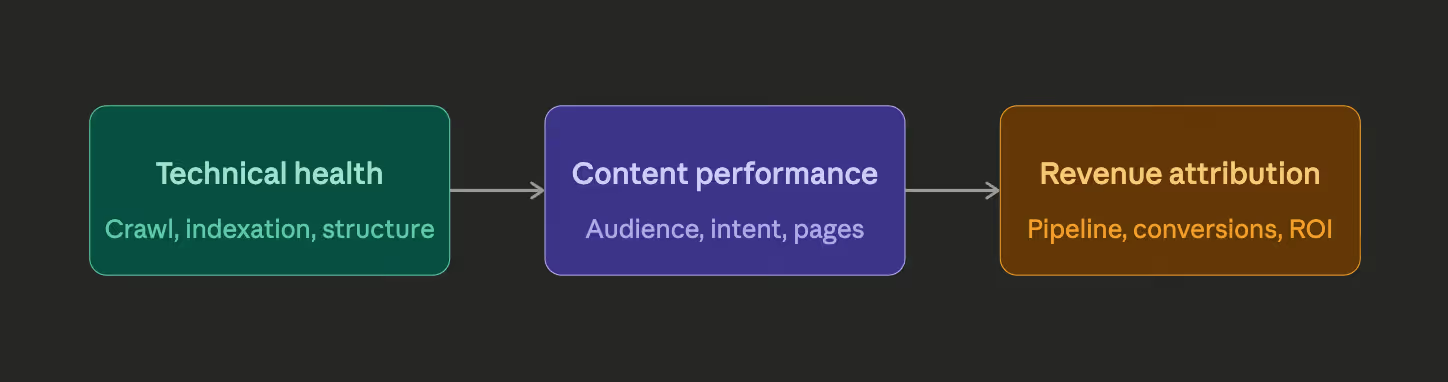
A performance model for Webflow SEO services is a system that connects three layers: technical health (can search engines find and understand the site?), content performance (is the right audience landing on the right pages?), and revenue attribution (is that audience converting and contributing to closed deals?).
When all three layers are aligned and measured together, SEO stops being a cost center and becomes a predictable revenue input.
Here's how the three layers relate to each other in practice:
Crawl efficiency: the revenue impact most teams overlook
Crawl efficiency is how effectively Googlebot (and Bingbot) can discover, process, and understand your Webflow site. Most marketing teams treat this as a purely technical concern, something for developers to sort out. That's a mistake.
Every time Googlebot wastes crawl budget on duplicate URLs, redirect chains, or thin CMS-generated pages, it means fewer of your high-value, transactional pages get crawled and updated in the index. When your top-converting service pages or case study pages fall behind on crawl frequency, their rankings drop, and organic traffic to those revenue-contributing pages declines.
For Webflow sites specifically, crawl efficiency issues often come from:
- Auto-generated collection pages with minimal content variation, creating near-duplicate URLs that dilute crawl budget
- Unoptimized redirect chains from legacy page structures or CMS migrations, adding unnecessary latency
- Missing or misconfigured
robots.txtthat either blocks pages that should be indexed or wastes crawl budget on search-result pages - No XML sitemap strategy — Webflow can generate sitemaps, but without deliberate configuration, low-priority pages end up submitted alongside your most important ones
A well-structured crawl efficiency strategy for a Webflow site involves auditing these issues regularly, using tools like Screaming Frog or Sitebulb, and making informed decisions about which pages deserve crawl priority.
The revenue connection is direct: Google's John Mueller has confirmed that crawl budget is a real concern for larger sites. A Webflow site with hundreds of CMS collection items, team members, blog posts, and service pages can absolutely encounter crawl budget constraints, especially during high-growth phases when new content is being published frequently.
Indexation management and what it costs you when it fails
Indexation management is the practice of ensuring that the pages you want Google to rank are indexed, and the pages you don't want ranked are kept out. In Webflow, this is more nuanced than it sounds.
Webflow's CMS generates pages dynamically. Every new blog post, team member, or portfolio item creates a new URL. Without deliberate indexation strategy, you end up with hundreds of thin, low-quality pages competing with your core service pages for attention and authority.
Managing indexation in Webflow means using noindex tags deliberately, configuring canonical tags correctly (especially for filtered or paginated views), and periodically auditing your Google Search Console coverage report to catch indexation drops early.
A key principle: every page in your Webflow CMS should have a clear answer to the question "why does this page deserve to be indexed?" If it can't contribute to a business outcome, either directly through conversion or indirectly through brand authority, it probably shouldn't be in the index.
Structured data and its role in qualified traffic
Structured data (Schema.org markup) is one of the most underutilized levers in Webflow SEO services. It doesn't directly boost rankings in most cases, but it does something arguably more valuable for revenue attribution: it helps search engines surface your content to more qualified audiences, at the right moment in their buying journey.
For B2B companies on Webflow, the most impactful Schema types include:
OrganizationandLocalBusiness- establishing entity authority and helping Google understand who you areService- marking up your core offering pages with structured data that search engines can parse and surface in AI Overviews and rich resultsFAQPage- enabling FAQ rich snippets that occupy more SERP real estate and filter for informational intentArticle/BlogPosting- improving content indexation signals and supporting featured snippet eligibilityBreadcrumbList- improving SERP display and internal link authority distribution
Webflow supports custom code embeds and <head> injection, which means JSON-LD Schema can be added cleanly to any page or collection template. The challenge is doing this systematically rather than page by page.
The AEO (Answer Engine Optimization) dimension of structured data is increasingly important. As AI-powered search features (Google AI Overviews, Perplexity, Bing Copilot) pull structured answers from web content, sites with clean, well-structured Schema markup are more likely to be cited as sources. For B2B brands, being cited in AI-generated answers during the research phase of a buying journey is an awareness and authority touchpoint that directly feeds pipeline.
Analytics attribution alignment: connecting SEO to pipeline
This is where most Webflow SEO engagements fail. The technical work gets done. Rankings improve. Traffic grows. But when the CMO asks for a revenue figure, the SEO team pulls up organic sessions while the sales team looks at CRM data that says "source unknown" for half their deals.
Analytics attribution alignment is the practice of ensuring your measurement stack can trace a prospect's journey from organic search click to closed deal. For Webflow sites integrated with HubSpot or other CRMs, this requires deliberate setup across several layers.
The attribution chain typically looks like this:
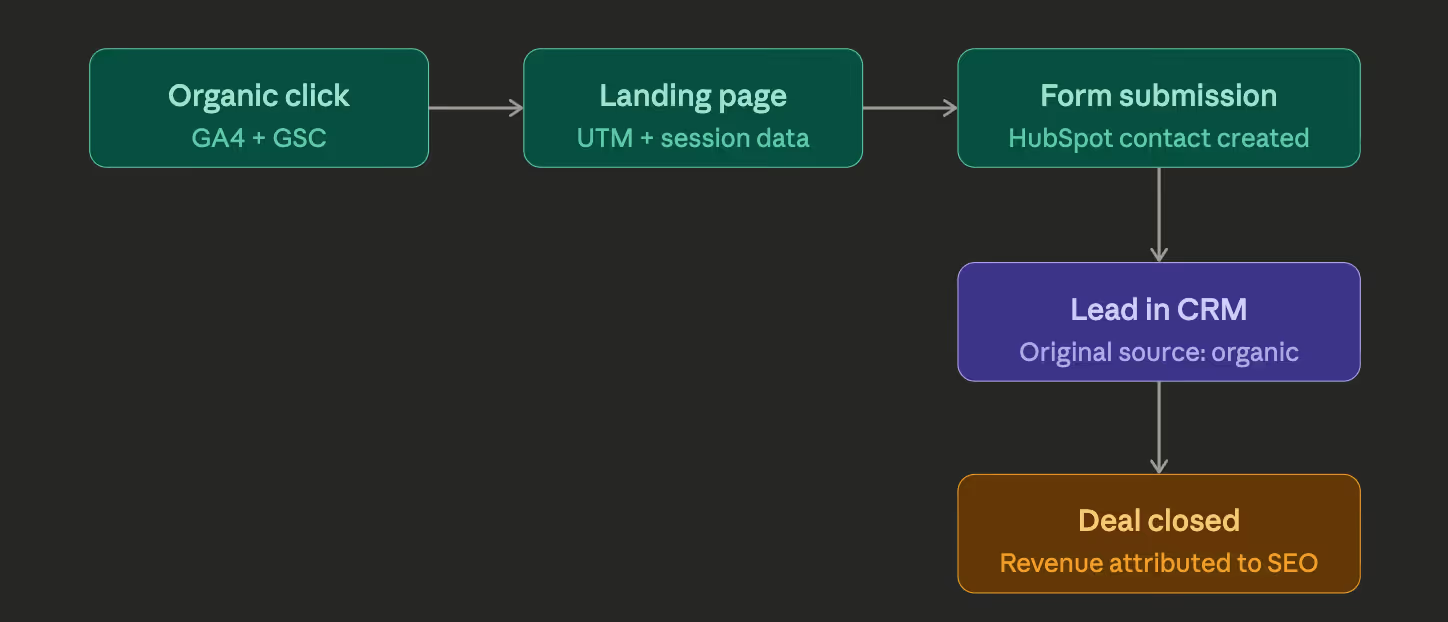
The common breakdowns in this chain include:
GA4 not properly configured with Google Search Console, meaning organic traffic data is fragmented. Webflow forms not passing UTM parameters through to HubSpot, which means contact records arrive without source data. Multi-touch attribution models not configured in the CRM, meaning deals closed after long research cycles don't credit the organic touchpoints that initiated them.
For Webflow teams working with HubSpot, fixing this requires both technical configuration and a deliberate attribution philosophy. First-touch attribution tends to benefit SEO (organic is often where the journey starts). Last-touch attribution tends to benefit paid retargeting (the final click before conversion). A linear or time-decay model typically gives the most accurate picture for B2B companies with 30-90 day sales cycles.
The HubSpot and Webflow integration that Broworks implements for enterprise clients includes UTM parameter preservation through form submissions, original source field mapping, and revenue-by-source reporting, so the attribution chain is intact end to end.
Key metrics that tie organic SEO to revenue
For marketing directors presenting to leadership, the right metrics bridge the gap between SEO activity and business outcome. Here's the framework we recommend:
Tier 1: Organic channel health indicators
These are the diagnostic signals, tracked weekly to catch issues early.
- Organic impressions (GSC) - trending up or down
- Average position for target keyword clusters
- Crawl coverage report - indexed pages vs. submitted pages
- Core Web Vitals pass rate (LCP, INP, CLS)
Tier 2: Traffic quality indicators
These tell you whether the right people are arriving, tracked monthly.
- Organic sessions segmented by page type (service pages, blog, case studies)
- Engagement rate on organic sessions (GA4), are visitors reading or bouncing?
- Pages per session and session duration by organic landing page
- Branded vs. non-branded organic split, non-branded growth signals new audience acquisition
Tier 3: Revenue attribution indicators
These are the business-outcome metrics, tracked quarterly with monthly check-ins.
- Organic-sourced form submissions and demo requests
- Organic-sourced contacts in CRM by month
- Pipeline value attributed to organic-first touchpoints
- Revenue closed from organic-sourced contacts (12-month rolling)
- Cost per organic lead vs. paid channel equivalents
The last metric in that list, cost per organic lead vs. paid, is often the most compelling argument for SEO investment. Paid search for competitive B2B terms can reach $40-$150 per click. A well-performing Webflow SEO program that generates 200 qualified organic leads per month at a fraction of that cost presents an obvious ROI narrative for any leadership team.
Here's how those three tiers of metrics typically look across a maturing Webflow SEO program:
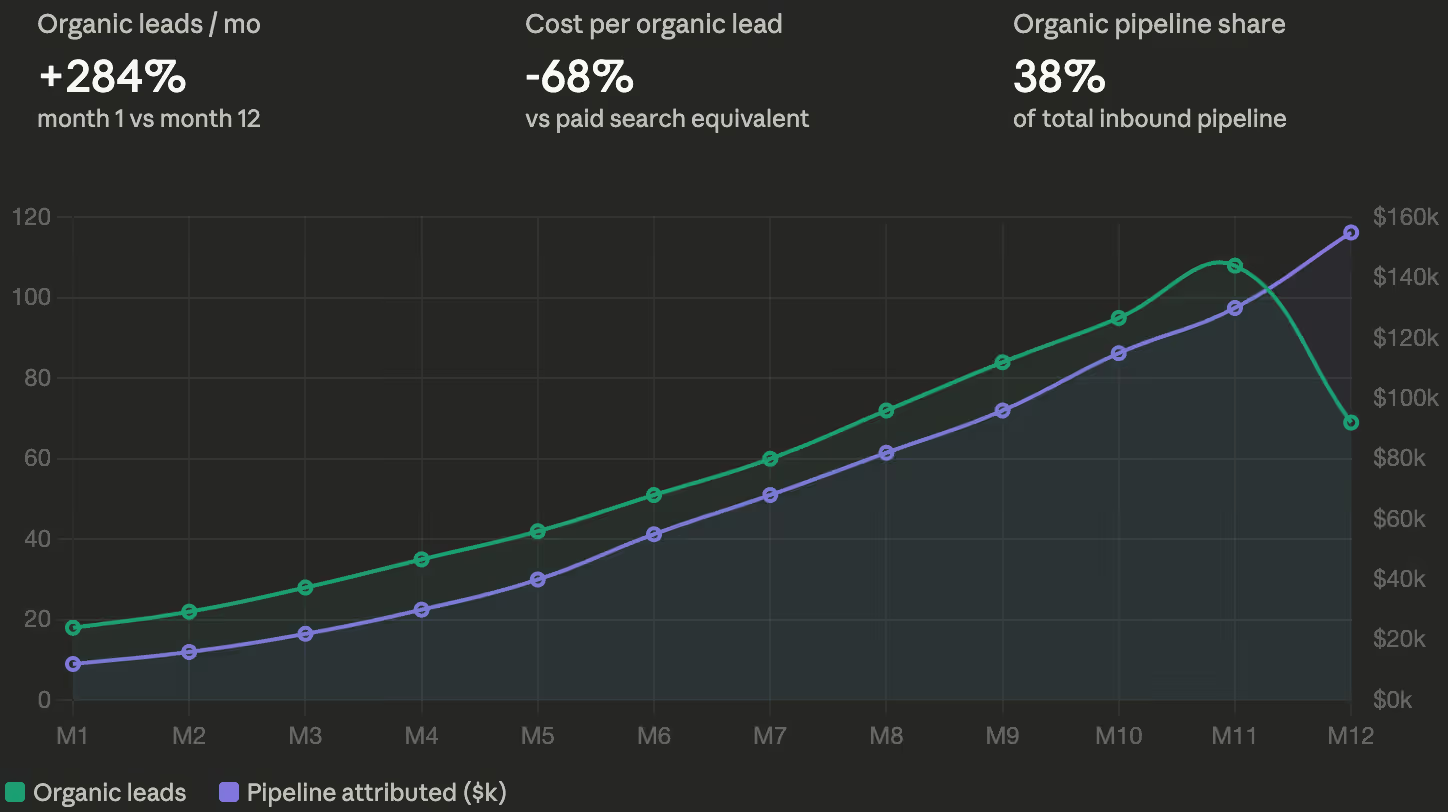
The chart above illustrates the typical growth curve seen in a 12-month Webflow SEO engagement when the performance model is implemented correctly. Leads and pipeline grow in parallel, which is the signal that attribution is working and that SEO is capturing genuinely qualified demand, not just inflating vanity traffic.
Final Toughts
Treating Webflow SEO services as a performance system, rather than a collection of individual tactics, is what separates teams that can prove ROI from those that can't. Crawl efficiency, indexation management, structured data, and analytics attribution aren't independent checkboxes. They're interconnected layers of a model that, when built correctly, turns organic search into a predictable revenue channel.
If your team is ready to connect SEO fundamentals to pipeline and revenue, contact us to do exactly that.
.svg)
.svg)


