How Much Does Webflow Cost in 2026?


TL;DR
- Webflow pricing in 2026 depends on the type of project, CMS requirements, traffic volume, localization needs, and team collaboration features.
- While Webflow can appear more expensive than basic website builders, many businesses reduce development, hosting, and maintenance costs by consolidating tools into one platform.
- Understanding the difference between Site Plans, Workspace Plans, CMS limits, and add-ons is critical before estimating total Webflow costs.
Webflow Pricing Breakdown 2026: Every Plan, Real Costs, and Cost-Saving Tips That Work
If you've ever opened the Webflow pricing page and felt the urge to close the tab, you're not alone. The Webflow pricing breakdown for 2026 is meaningfully different from what you may remember, because Webflow has simplified its Site plan lineup, introduced a new Premium tier that consolidates what used to require two separate plans, and expanded its platform into AI tooling, analytics, A/B optimization, and Answer Engine Optimization (AEO).
This guide reflects the latest pricing structure, pulled directly from webflow.com/pricing and the official 2026 plan update. Whether you're a marketing director evaluating Webflow for your team, a founder considering a migration from WordPress, or an agency scoping a client project, here is every plan, every real cost, and the cost-saving decisions that most buyers miss.
All pricing verified against webflow.com/pricing and Webflow's 2026 simplified plan update, May 2026.
The Biggest Change in 2026: Webflow's Simplified Plan Structure
Webflow has restructured its Site plans. The old three-tier model (Basic, CMS, and Business) has been simplified into two tiers: a refreshed Basic plan and a new Premium plan.
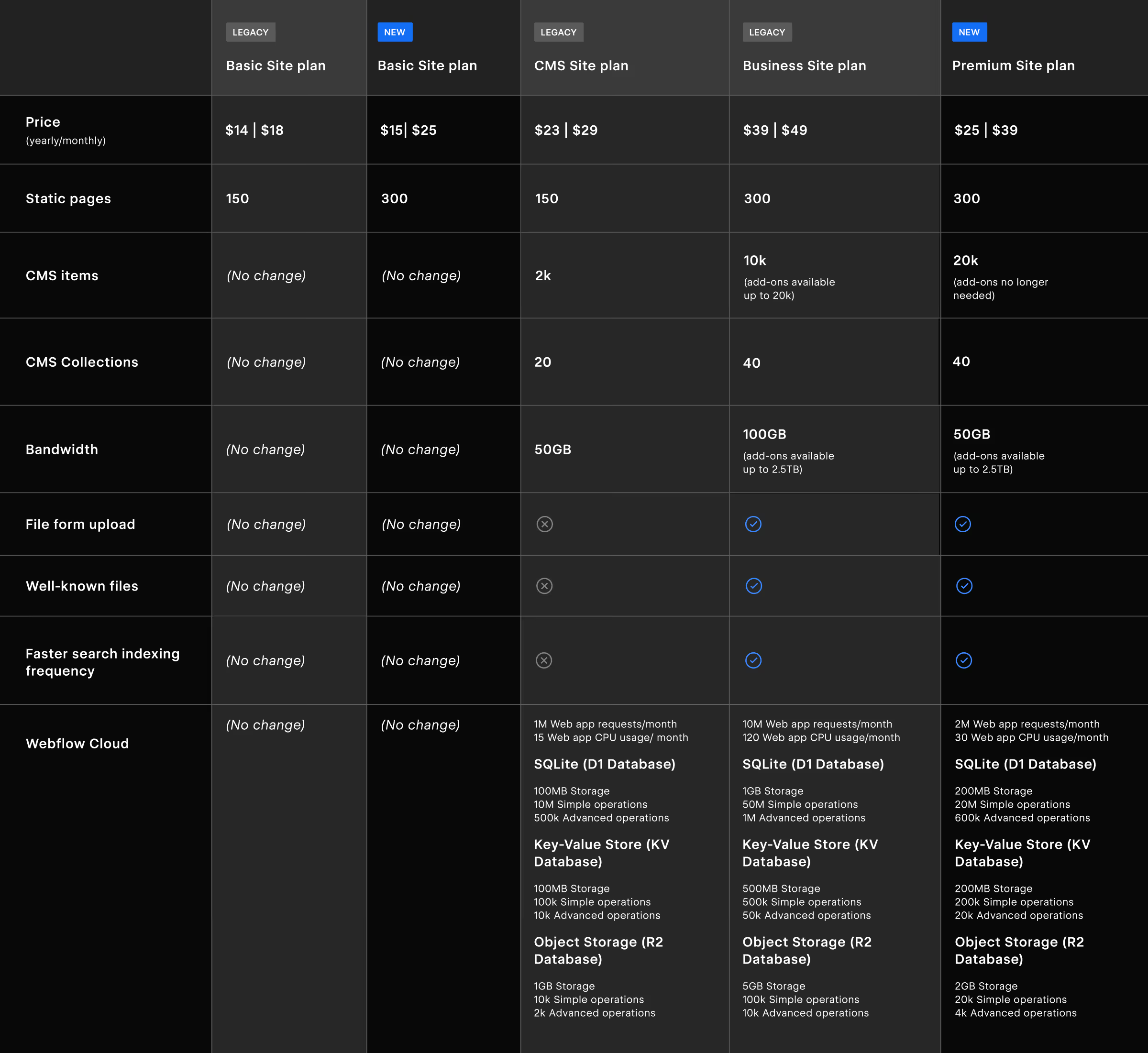
The new Premium plan is the headline change. At $25/month billed annually (or $39/month billed monthly), it consolidates what previously required choosing between the CMS plan ($23/month annual) for content sites and the Business plan ($39/month annual) for higher traffic and CMS needs. Premium gives you 20,000 CMS items and 40 CMS Collections from day one, at a lower entry price than the old Business plan.
This is not just a cosmetic rebrand. It genuinely changes the math for most content-driven marketing teams, SaaS companies, and agencies pricing client work. Here is what the full picture looks like.

How Webflow Pricing Is Structured
Before comparing any plan number, there is one foundational thing to understand: Webflow runs a dual billing system. You are always paying for two separate things that serve entirely different purposes.
Site Plans cover your published website. Each site you want to host on a custom domain needs its own Site plan. This controls your hosting, bandwidth, CMS item limits, page count, and feature access. Think of it as your hosting bill.
Workspace Plans cover your team's design and collaboration environment where you build, stage, and manage sites, assign roles, and handle client access. Workspace plans are charged separately from Site plans.
On top of both, Webflow now offers modular Add-ons, Optimize (A/B testing and personalization), Analyze (native analytics), Localize (multi-language), and Webflow AEO (AI search visibility, coming soon for Enterprise), which plug into your Site plan independently.
Most people budget based on a Site plan alone, then discover mid-project that team access, seat costs, and Add-ons bring their actual invoice significantly higher. Plan accordingly.
Webflow Site Plans: New Basic and New Premium Explained
Starter - Free
The Starter plan is Webflow's free tier, positioned for learning, prototyping, and experimenting with Webflow AI. You get a webflow.io subdomain (no custom domain), 2 static pages, 20 CMS Collections, 50 CMS items, 1GB bandwidth, and a lifetime cap of 50 form submissions. Webflow AI is included. Not suitable for any live brand or client site.
Basic (New) - $15/month annual | $25/month monthly
The new Basic plan is an updated version of the legacy Basic. The price increases modestly from $14/month to $15/month on annual billing, and more significantly from $18/month to $25/month on monthly billing. In exchange, you get a meaningful upgrade: 300 static pages (up from 150 on the legacy plan), a custom domain, unlimited form submissions, surge protection, and full Webflow AI access. There is still no CMS, which means no blog, no dynamic content collections, and no structured content. If any of those are in scope now or in six months, start on Premium instead.
Premium (New) - $25/month annual | $39/month monthly
The Premium plan is the standout change in Webflow's 2026 pricing. It replaces both the legacy CMS and legacy Business plans with a single, cleaner tier. Here is what you get:
- 300 static pages
- 20,000 CMS items, no add-ons required for items
- 40 CMS Collections
- 50GB bandwidth base (add-ons available up to 2.5TB)
- Unlimited form submissions
- Form file upload
- Well-known files support
- Faster search indexing frequency
- Surge protection
- Full Webflow AI (SEO and AEO suggestions, CMS generation, copy generation)
- Webflow Cloud: 2M web app requests/month, 30 CPU minutes/month, SQLite (200MB), Key-Value Store (200MB), Object Storage (2GB)
The critical point: 20,000 CMS items at $25/month annual was previously only accessible on the Business plan at its highest add-on tier, costing significantly more. For content-heavy marketing operations, this is a genuine improvement in value.
Enterprise -Custom pricing
Enterprise is designed for high-traffic organizations requiring custom limits, guaranteed SLA uptime, advanced collaboration controls, enterprise security, and dedicated customer success. It also includes access to Webflow AEO (coming soon), the platform's native Answer Engine Optimization tooling for AI search visibility. Pricing is negotiated directly with Webflow's sales team.
Legacy vs. New Plans: What Changed
The practical takeaway: if you were on the legacy CMS plan, upgrading to Premium gives you 10× more CMS items and all the Business-tier features at only $2/month more annually. If you were on the legacy Business plan, the Premium plan offers the same CMS item ceiling at a significantly lower starting price — though note that the base bandwidth drops from 100GB to 50GB, so high-traffic sites will still need bandwidth add-ons.
What are the Webflow Site plans available in 2026? Following Webflow's 2026 plan simplification, there are three publicly priced Site plans: Starter (free), Basic ($15/month annual or $25/month monthly), and Premium ($25/month annual or $39/month monthly). A separate Enterprise plan exists at custom pricing. The new Premium plan replaces the legacy CMS and Business tiers, bundling 20,000 CMS items and 40 Collections into a single, lower-cost plan. Legacy plans (CMS, Business) remain for existing subscribers but new customers are directed to the simplified structure.
Webflow Workspace Plans: For Teams and Agencies
Workspace plans control your team's collaboration environment and are charged separately from Site plans. Webflow offers two tracks: in-house teams and freelancers/agencies.
In-House Team Workspace Plans (annual billing):
- Starter - Free. 2 staging sites, 1 full seat, Webflow AI. No code export.
- Core - $19/month. 10 staging sites, 1 full seat, code export, Shared Libraries.
- Growth - $49/month. Unlimited staging sites, 1 full seat, site-specific access, site-level roles, publishing permissions, 301 redirects on staged sites, advanced collaboration controls.
- Enterprise - Custom. SSO, SCIM provisioning, audit log API, custom staging domains, publishing workflows, design approvals, and dedicated customer success.
Freelancer and Agency Workspace Plans (annual billing):
- Starter - Free. 2 staging sites, 1 free client seat per paid site.
- Freelancer - $16/month. 10 staging sites, 1 free client seat per site, client payments, code export, Shared Libraries.
- Agency - $35/month. Unlimited staging sites, 3 free client seats per site, advanced roles and permissions, Shared Libraries, code export.
For Webflow development agencies managing multiple clients simultaneously, the Agency Workspace is almost always the correct starting point. The unlimited staging capacity and built-in client seat model are specifically designed for that workflow.
Seat-Based Billing: The Hidden Cost Most Teams Miss
One full seat is included with every paid Workspace plan. After that, each additional collaborator costs extra based on their role:
- Full seat: $39/month (annual) - for teammates who design sites or manage admin settings
- Limited seat: $15/month (annual) - for teammates who edit content or build pages using approved components
- Free seat: $0 - for reviewers and commenters
The most common billing surprise: marketing teams onboarding a content writer, a campaign manager, and a social coordinator into a Workspace, then discovering that each person is a $15/month Limited seat on top of the plan base. A five-person team on the Growth Workspace ($49/month) with four Limited seats ($60/month) is paying $109/month for Workspace alone, before any Site plan costs enter the equation.
Before adding any collaborator, confirm whether they genuinely need Full access or whether Limited is sufficient. That single decision is the most reliable cost control lever in Webflow's billing structure.
What is Webflow's new Premium plan and how does it differ from legacy plans? The Webflow Premium plan, introduced in the 2026 simplified pricing update, replaces the legacy CMS and Business Site plans. Priced at $25/month billed annually (or $39/month billed monthly), it includes 20,000 CMS items, 40 CMS Collections, 50GB base bandwidth (extendable to 2.5TB via add-ons), form file uploads, well-known file support, faster search indexing, and Webflow Cloud capabilities. It delivers what previously required the Business plan at a significantly lower monthly cost, making it the default recommendation for content-driven marketing sites and SaaS teams.
Webflow Ecommerce Plans: What Online Sellers Need to Know
Webflow's Ecommerce plans are purchased separately and layer commerce functionality on top of the equivalent Site plan infrastructure. These have not changed with the 2026 update.
- Standard - $29/month (annual): Built on the legacy CMS plan foundation. Up to 500 ecommerce items, 2,000 CMS items, and a 2% transaction fee on every sale on top of payment processor fees (Stripe, PayPal).
- Plus - $74/month (annual): Built on the Business plan foundation. Up to 5,000 ecommerce items, 10,000 CMS items, 0% transaction fee, unbranded transactional emails.
- Advanced - $212/month (annual): Also Business-plan based. Up to 15,000 ecommerce items, 10,000 CMS items, 0% transaction fee, 15 staff accounts.
The transaction fee on Standard is the key decision point. If your store generates meaningful monthly revenue, the math on upgrading from Standard to Plus almost always favors Plus quickly. A store doing $5,000/month in sales saves $100/month in transaction fees on Plus, more than covering the plan difference.
Webflow Add-ons in 2026: Optimize, Analyze, Localize, and AEO
Webflow has consolidated its premium capabilities into modular Add-ons that bolt onto any paid Site plan. These are the tools that take Webflow beyond website hosting into what the company calls the Website Experience Platform (WXP).
Optimize - from $299/month
Includes A/B testing, multivariate testing, AI-driven personalization, audience targeting (device, behavioral, UTM, geolocation), and audience insights. Up to 5 concurrent optimizations on the base tier, with pricing scaling by monthly page view volume. Enterprise Optimize adds HubSpot, Salesforce, Marketo, 6Sense, and Demandbase integrations for account-based marketing targeting.
Analyze - from $9/month
Native, privacy-first analytics built directly into the Webflow dashboard. Auto-captures page views, sessions, visitors, and click data without third-party cookies. Pricing scales by session volume starting at 2,000 sessions/month. Worth evaluating as a replacement for or complement to your existing analytics stack before purchasing, for many small to mid-sized teams, it covers what they actually use in GA4.
Localization Essential - $9/month per locale (up to 3 locales)Localization Advanced - $29/month per locale (up to 10 locales)
Both tiers include machine-powered translation, CMS localization, static page localization, localized SEO, and style localization. Advanced adds asset localization, localized URLs, and automatic visitor routing based on browser language and geography. For SaaS companies expanding internationally, Advanced is typically the minimum viable tier.
Webflow AEO - Coming soon (Enterprise only)
This is the newest and most forward-looking addition to Webflow's platform. AEO (Answer Engine Optimization) is designed to help brands appear in AI-generated search results from tools like ChatGPT, Perplexity, and Google AI Overviews. The LLM visibility and AEO strategy work we do at Broworks gives us a direct perspective on why early movers in this space will hold a durable competitive advantage. If AI search visibility is a strategic priority in your 2026 marketing plan, this is one to monitor closely as it rolls out.
Overage Costs and Surge Protection Explained
Bandwidth overages are the most common billing surprise on Webflow. Understanding surge protection mechanics prevents unexpected invoice spikes.
Every paid Site plan (Basic, Premium, and Ecommerce) includes surge protection. If your site exceeds its monthly bandwidth limit in month one, you are protected at no additional charge. If it exceeds the limit for a second consecutive month, Webflow automatically upgrades your Site plan to the next appropriate bandwidth tier and bills accordingly from that point forward.
For the Premium plan, bandwidth add-ons are available on demand:
- +50GB: $20/month (annual)
- +100GB: $40/month (annual)
- +200GB: $80/month (annual)
- Up to +2.4TB additional: $960/month (annual)
Note that the new Premium plan starts bandwidth at 50GB, the same base as the legacy CMS plan, not the 100GB base of the legacy Business plan. Sites that previously ran on Business for bandwidth headroom should factor this into their plan selection and budget for bandwidth add-ons if needed. For most B2B marketing sites with optimized assets and reasonable traffic levels, 50GB is more than sufficient to start.
How to Calculate Your True Monthly Cost
The right approach is to build your cost from the full stack, not from any single plan number.
Step-by-step cost calculation:
- Site plan - Choose Basic ($15/mo annual) or Premium ($25/mo annual) based on whether you need CMS and dynamic content.
- Workspace plan - Choose in-house or agency track, then tier to your team size and staging needs. Core ($19/mo) for solo professionals, Growth ($49/mo) for teams with role-based access needs, Agency ($35/mo) for client work.
- Additional seat costs - Count how many collaborators need Full access ($39/mo each) versus content editor access via Limited seats ($15/mo each).
- Add-ons - Add only what replaces an existing cost or directly drives measurable ROI. Analyze ($9/mo) often replaces a third-party tool. Optimize ($299/mo) is enterprise-tier and should be evaluated against your current CRO spend.
- Bandwidth add-ons - Factor these in if your site traffic or media-heavy pages are likely to push past 50GB/month regularly.
A realistic example - B2B SaaS marketing team of 4:
Premium Site plan ($25/mo) + Growth Workspace ($49/mo) + 3 Limited seats ($45/mo) + Analyze ($9/mo) = $128/month on annual billing.
That is a materially different number from the $25/month headline, and it is the right number to bring to a budget conversation.
How can you reduce your Webflow cost in 2026? The most effective ways to reduce Webflow costs in 2026 are: switching to annual billing (saves up to 33% versus monthly), starting on the Premium plan rather than stacking legacy plan upgrades, auditing seat types so content editors use Limited seats ($15/month) rather than Full seats ($39/month), using Webflow's built-in AI and Analyze features before purchasing additional third-party tools, and monitoring bandwidth usage proactively to avoid automatic plan upgrades triggered by two consecutive months of overage.
Cost-Saving Tips That Actually Work
The moves that genuinely reduce your Webflow bill:
- Commit to annual billing. The savings range from 20% to 33% depending on the plan. On Premium plus a Growth Workspace, annual billing saves approximately $200–$300 per year compared to monthly.
- Use the new Premium plan, it's better value than the legacy Business plan for most teams. At $25/month annual, it gives you 20,000 CMS items and all Business-tier features at the same monthly price as the old Business plan's monthly billing rate. If you were on Business for CMS item headroom, Premium covers it at a lower cost.
- Audit seat types before onboarding your team. This is the single most overlooked cost reduction. Most content editors, copywriters, and campaign managers belong on Limited seats ($15/mo), not Full seats ($39/mo).
- Use surge protection as a buffer, not a plan upgrade trigger. One month over bandwidth is free. Before hitting month two, optimize image sizes, enable lazy loading, and assess whether a bandwidth add-on is cheaper than an automatic upgrade.
- Trial Analyze before adding other analytics tools. At $9/month, it covers most of what small and mid-sized marketing teams actually use daily in GA4, without the setup overhead.
- Use Webflow AI for copy and CMS generation. All paid Site plans include AI-powered copy generation, CMS collection building, and SEO/AEO suggestions. Fully using what's included before adding external tools is meaningful cost control.
- If you're migrating from WordPress, phase your plan selection. During a WordPress to Webflow migration, you may temporarily need more CMS item capacity than your steady-state site will require. The Premium plan's 20,000-item ceiling is now generous enough to cover most migration workflows without requiring additional add-ons.
Which Webflow Plan Is Right for You?
Rather than a single answer, here is how to think about it based on your specific situation.
You are a solo founder or startup launching your first marketing site without a blog:
Start with the new Basic plan ($15/month annual). You get 300 pages, a custom domain, surge protection, and Webflow AI, everything you need for a clean, fast-loading site. Add a Starter or Core Workspace.
You are a marketing team building a content-driven SaaS site with a blog, case studies, and resource library:
The new Premium plan ($25/month annual) is the answer. It gives you 20,000 CMS items and 40 Collections, more than enough for even ambitious content operations. Pair it with a Growth Workspace ($49/month) for role-based access and publishing controls. Add Analyze ($9/month) to replace your current analytics setup.
You are evaluating Webflow as part of an enterprise rebrand or platform consolidation:
Start with the Premium plan as your baseline and scope Enterprise for anything requiring custom SLAs, advanced security, or Webflow AEO access. Factor in Optimize for post-launch experimentation and Localization Advanced if international markets are in play. The resources section at Broworks includes guidance on how to structure this evaluation for marketing organizations.
You are a Webflow agency or freelancer:
Agency Workspace ($35/month) with client billing enabled. Each client site is hosted on its own Site plan purchased by the client, use Webflow's client seat model to give clients content access without charging them for a Workspace seat.
You are comparing the total cost of Webflow to your current WordPress setup:
The comparison almost always favors Webflow at the Premium plan tier when you factor in managed hosting, CDN, SSL, security, automatic backups, and the reduction in developer maintenance overhead. Teams that have made this move through our migration sprint process consistently find the total cost of ownership shifts positively within 12 to 18 months.
For official plan documentation and the most current feature matrix, the Webflow University pricing guide is the reference point to bookmark alongside the main pricing page.
.svg)
.svg)