How Enterprise Companies Manage Ongoing Webflow Support After Launch

TL;DR
- Problem: Enterprise Webflow sites don't fail at launch, they decay afterward, as dozens of stakeholders push competing changes without a shared process.
- Insight: Sustainable post-launch support is an operating model (structured intake, priority tiers and SLAs, QA with staged publishing, CMS governance, and continuous performance, accessibility, and integration monitoring) not a pile of ad-hoc edits.
- Takeaway: Whether you run support in-house, agency-led, or hybrid, formalize the four pillars (intake, prioritization, QA, publishing) so your site stays fast, on-brand, and revenue-generating long after go-live.
How Enterprise Companies Manage Ongoing Webflow Support Post-Launch
The way how enterprise companies manage ongoing Webflow support post-launch is by treating the live website as an operating system, not a finished project. Launch day is a milestone, not an endpoint. The moment a site goes live, marketing wants new campaign pages, legal wants disclaimer updates, IT wants integration changes, and analytics wants cleaner tracking, often in the same week. Without a clear model for ongoing Webflow support and maintenance, those requests collide, quality slips, and the site slowly drifts away from the standard it launched with.
This guide explains what actually happens after an enterprise Webflow site ships, why post-launch support needs a defined operating model, and how agencies and internal teams keep a site reliable, editable, and commercially useful long after the build is done.
What is ongoing Webflow support? Ongoing Webflow support is the structured system of intake, prioritization, quality assurance, and governance that keeps a live Webflow site accurate, fast, accessible, and on-brand. It covers content updates, design system upkeep, integrations, performance monitoring, and staged publishing, managed as a repeatable process rather than ad-hoc requests.
What actually happens after an enterprise Webflow site goes live
In smaller companies, one person edits the site when needed. In enterprises, the picture is different: dozens of stakeholders touch the same website, often with competing priorities and different definitions of "urgent."
A typical month after launch includes new landing pages for demand-gen campaigns, blog and resource publishing, pricing or product copy changes, legal and compliance edits, localization updates, and integration tweaks for tools like HubSpot, Segment, or a CRM. Each of these looks small in isolation. Together, they create a steady stream of changes that can quietly degrade a site if no one owns the workflow.
The risk isn't dramatic failure. It's slow decay: inconsistent components, broken links, orphaned CMS items, tracking that stops firing, and a design system that fragments as different editors reinterpret it. Enterprise post-launch Webflow support exists to prevent exactly this.
How enterprise companies manage ongoing Webflow support post-launch: the operating model
Enterprise teams manage ongoing Webflow support post-launch by defining a clear operating model who can request changes, how requests are prioritized, who builds and reviews them, and how they reach production safely. The model matters more than any single tool because it turns unpredictable requests into a predictable, auditable pipeline.
An operating model answers four questions that ad-hoc support never does:
- Intake. How does a request enter the system, and what information must it include?
- Prioritization. How do we rank a campaign page against a legal fix against a bug?
- Execution and QA. Who builds the change, and who checks it before it goes live?
- Publishing. How does a change reach production without breaking anything else?
When those four questions have documented answers, support scales. When they don't, the biggest or loudest stakeholder wins, and the site pays for it.
Who's involved: mapping Webflow support across the organization
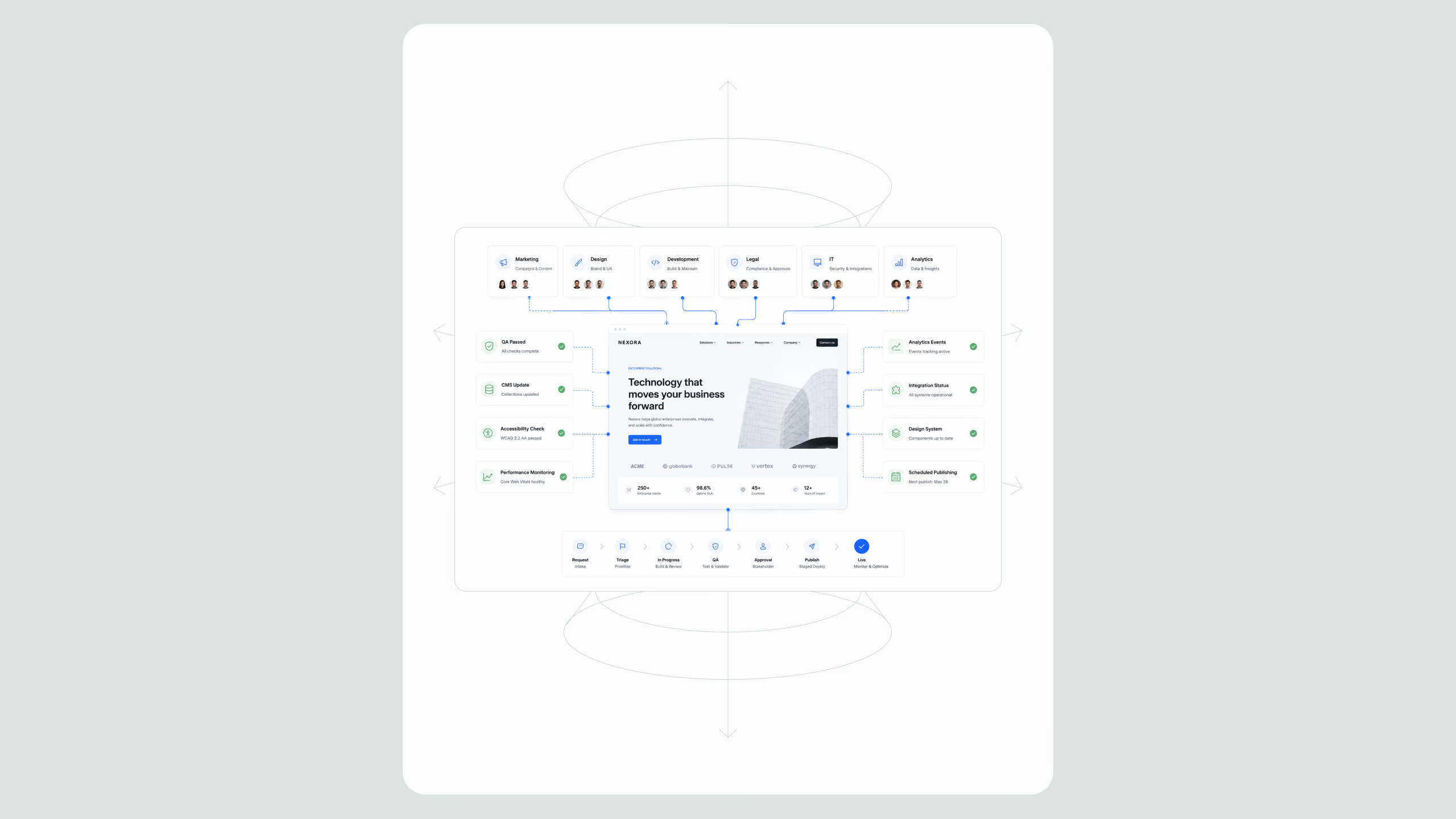
Who manages updates on an enterprise Webflow site? Updates are managed across several teams rather than a single owner: marketing drives content and campaigns, design protects the visual system, development handles complex builds and integrations, while legal, IT, and analytics govern compliance, security, and measurement. A support model coordinates them so no team blocks another.
Here's how responsibilities typically distribute in an enterprise engagement:
- Marketing - Requests campaign pages, blog posts, and copy changes; owns messaging and publishing cadence.
- Design - Guards the design system, component library, and brand consistency across new pages.
- Development - Handles custom code, complex interactions, API work, and anything beyond the CMS editor.
- Legal and compliance - Reviews claims, disclaimers, privacy language, and regulated content before publishing.
- IT and security - Manages access, domains, DNS, single sign-on, and integration security.
- Analytics - Maintains tracking, event tagging, and dashboards so marketing can measure performance.
The support model's job is to let all six groups move without stepping on each other. That's why enterprises increasingly lean on a dedicated Webflow development partner or an internal center of excellence to hold the process together.
The core components of an enterprise Webflow support system
Strong post-launch support isn't one service, it's a set of connected workflows. Below are the components that separate a professional operating model from reactive firefighting.
Structured request intake
Every reliable support system starts with a single front door. Instead of edits arriving through Slack, email, and hallway conversations, requests flow through one intake form or ticketing tool that captures the essentials: what's changing, why, the deadline, the owner, and any legal or brand review needed.
A clean intake workflow usually looks like this:
- Submit - The requester files a ticket with context, assets, and a target date.
- Triage - The support lead validates scope, flags dependencies, and assigns a priority level.
- Build in staging - The change is created in a staging environment, never directly on the live site.
- QA - A reviewer checks design, responsiveness, links, and tracking against a checklist.
- Approve - Stakeholders (and legal, where relevant) sign off.
- Publish and monitor - The change goes live on a scheduled window and is monitored afterward.
Priority levels and SLAs
Not every request deserves the same speed. Enterprise support models define priority tiers, for example, P1 for live bugs and broken conversion paths, P2 for time-sensitive campaigns, P3 for standard content, and P4 for backlog improvements. Each tier carries a service-level agreement (SLA) so stakeholders know what "soon" actually means. This is where a Webflow support retainer earns its value: predictable turnaround replaces guesswork.
QA workflows and staged publishing
Why does staged publishing matter for enterprise sites? Staged publishing matters because it lets teams build and review changes in a safe environment before they reach visitors, preventing a rushed edit from breaking a live conversion path. On enterprise sites where a single page can drive significant pipeline, "publish and hope" is not an acceptable process.
QA should be checklist-driven and consistent: responsive behavior across breakpoints, cross-browser rendering, working links and forms, correct CMS bindings, and intact tracking. Webflow's own publishing and staging behavior is documented in the Webflow University resources, and mature teams wrap those capabilities in a formal review gate so nothing ships unchecked.
CMS governance
As content scales, so does CMS complexity. Governance means defining collection structures, naming conventions, required fields, and editor permissions, then enforcing them. Without governance, you get duplicate collections, inconsistent slugs, orphaned reference items, and editors overwriting each other. With it, a large content library stays queryable, consistent, and safe to hand to non-technical marketers.
Design system maintenance
A Webflow site launches with a coherent component and style system. Six months of edits by different hands can quietly erode it. Design system maintenance keeps class structures, components, and variables disciplined so new pages inherit the right styling instead of introducing one-off overrides. Nielsen Norman Group's research on design systems and consistency explains why this consistency directly affects usability and trust, and why enterprises invest in protecting it.
Performance, accessibility, and integration support
Three technical disciplines run continuously in the background:
- Performance monitoring keeps the site fast as pages, scripts, and third-party tools accumulate. Google's Core Web Vitals give teams measurable thresholds for loading, interactivity, and visual stability to monitor over time.
- Accessibility checks ensure new pages continue to meet standards such as the W3C's Web Content Accessibility Guidelines, protecting both users and the organization from compliance risk.
- Integration support maintains the connections between Webflow and the marketing stack forms feeding a CRM, analytics events firing correctly, and automation tools staying in sync.
Analytics updates and staged publishing rhythm
Finally, ongoing support keeps measurement honest. As campaigns launch and pages change, tracking has to be updated so leadership sees accurate data. This is also where AI search visibility increasingly matters: keeping content structured and machine-readable supports both traditional analytics and AI and LLM search visibility. Sustained attention to structure and performance is what turns a launch into durable results, for Frontera, a Broworks-built site paired with ongoing optimization contributed to a 200%+ increase in organic traffic and 5x more candidate applications, while enterprise hardware client Epiq Solutions saw a 3x increase in conversions.
In-house, agency-led, or hybrid: choosing a support model
Enterprises generally run post-launch Webflow support in one of three ways, and the right choice depends on internal capacity, request volume, and how much specialist Webflow depth the team already has.
Many companies migrating from legacy platforms start with agency-led support and shift toward hybrid as their team matures, a pattern common in WordPress to Webflow migrations, where the agency that rebuilt the site is best positioned to maintain it.
How to evaluate an ongoing Webflow support model
When assessing an internal plan or an external partner, pressure-test it against a short checklist:
- Is there a single, documented intake channel?
- Are priority tiers and SLAs written down and agreed?
- Does every change pass through staging and QA before publishing?
- Is CMS structure governed by conventions, not habit?
- Is someone accountable for the design system, performance, and accessibility over time?
- Are analytics and integrations checked whenever pages change?
If the answer to most of these is "yes," the site will stay reliable and commercially useful. If it's "no," the site was built to launch, not to last.
.svg)
.svg)