GA4 Bot Traffic From China and Singapore: How to Identify, Filter, and Fix the Spike
TL;DR
A surge of GA4 traffic from China and Singapore is usually bot-driven, not real users. These hits inflate sessions, break conversion data, and distort AI-search visibility signals. This guide explains how to confirm bot traffic, why GA4 struggles to filter it natively, and how to block or exclude it using GA4, Google Tag Manager, and Webflow-friendly methods, without harming legitimate traffic.
Introduction: Why GA4 traffic spikes from China and Singapore are a red flag
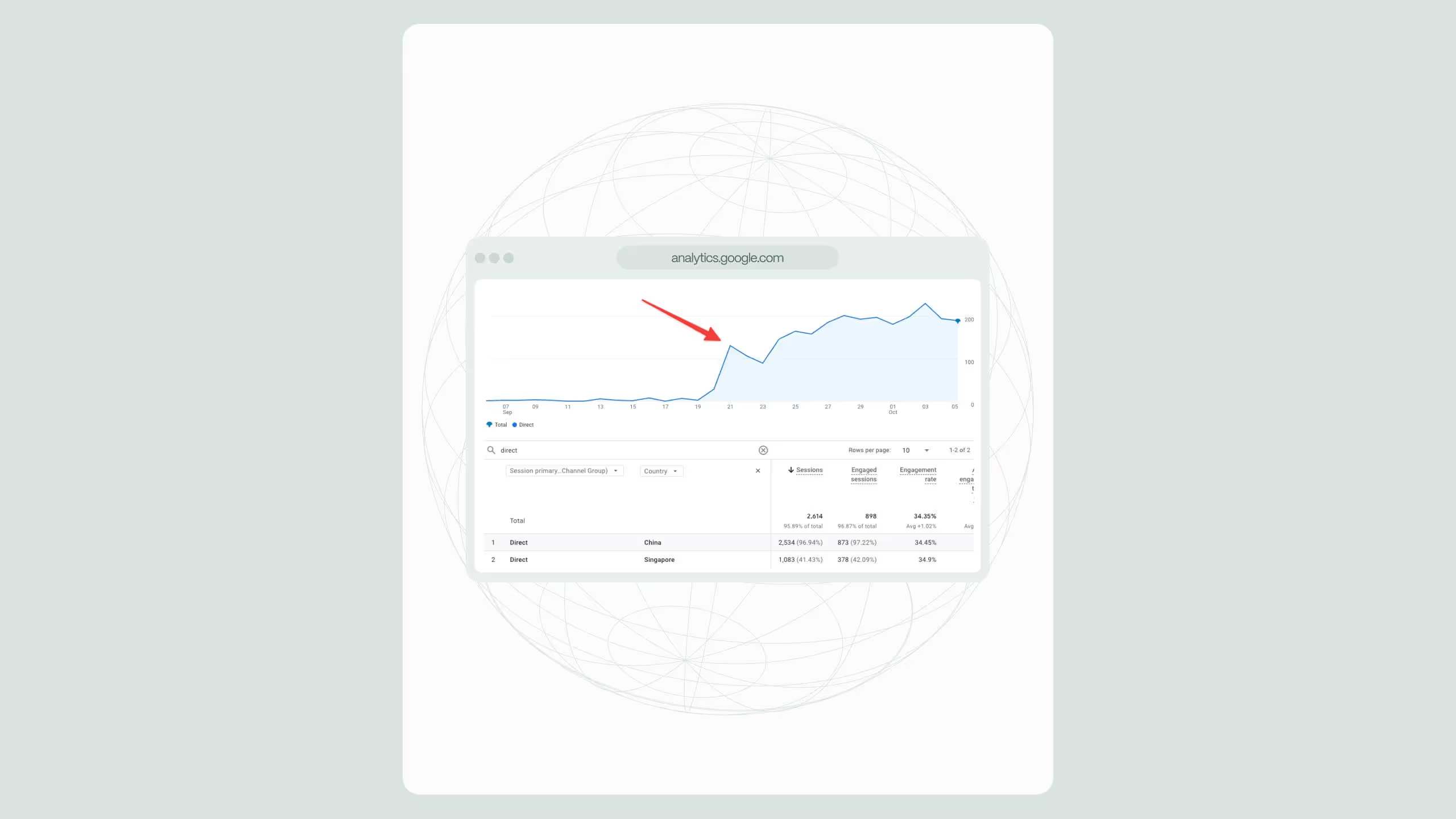
If your GA4 dashboard suddenly shows traffic spikes from China or Singapore, despite not targeting those regions, you're likely not seeing international growth. You’re seeing automated traffic.
This pattern has become increasingly common since mid-2024 and accelerated through 2025 due to:
- AI training crawlers masquerading as browsers
- Proxy-based scraping networks using APAC IP pools
- “Headless” Chrome bots triggering GA4 events
The problem isn’t just inflated traffic numbers. Bot traffic pollutes:
- Engagement rate
- Conversion attribution
- SEO & AEO signals used by Google and LLMs
- Internal decision-making (what pages “perform”)
For Webflow-hosted sites in particular, the issue is amplified because:
- You don’t control server-level bot filtering
- GA4 removed many UA-era filters
- GTM setups often fire too early
Before you block anything, you need to prove it’s bot traffic.
How to confirm GA4 bot traffic from China and Singapore
- Country spike with no business logic
If China or Singapore suddenly appears in your top 3 countries, ask: Do you sell there? Do you localize content there? Do you run ads there? If the answer is no, proceed.
- Zero-engagement sessions
In GA4: Reports → Engagement → Pages and screens; Add secondary dimension: Country; Compare sessions vs engagement rate.
Bot patterns usually show: Engagement rate near 0%; Session duration < 3 seconds; Single page hits (often homepage).
- Suspicious tech profiles
Check: Browser: “Chrome” (generic, no version depth); OS: “Linux” or “(not set)”; Screen resolution: missing or identical across sessions. These signals indicate headless or scripted clients.
Why GA4 alone cannot reliably filter this traffic
Google Analytics 4 intentionally removed: IP-based filters, country exclusion filters, view-level data isolation. Google’s position is that: “Bot filtering should be handled upstream or via tagging logic.” This means you must intervene before GA4 processes the hit.
Option 1: GA4-only mitigation (weak, but sometimes necessary)
If you cannot use GTM, your only GA4-native options are:
- Build a comparison excluding China + Singapore
- Use it consistently for reporting
This does not stop bots, but protects KPI interpretation and prevents leadership misreads.
⚠️ This does nothing for AI-search signals or raw event data.
Option 2: Google tag manager filtering (recommended)
This is the most effective approach for Webflow-hosted sites. GTM lets you inspect request context, block GA4 events before firing, and apply logic GA4 no longer supports.
GTM method A: Country-based suppression (best balance)
How it works
- GA4 config tag fires only if country ≠ China/Singapore
- Uses GA4’s built-in geo resolution
Implementation
- Create a GA4 Configuration tag
- Add a trigger condition:
{{Page URL}}matches.*
- Add a blocking trigger:
- Variable:
{{Country}} - Condition: equals
ChinaORSingapore
- Variable:
⚠️ This relies on Google’s IP resolution and effective for 90% of bot networks.
GTM Method B: Engagement-gated firing (advanced)
Instead of blocking by country, block by behavior.
Only fire GA4 if:
- Scroll ≥ 25%
- OR click detected
- OR time on page > 10s
Bots usually fail these thresholds. This protects: Legit international users, VPN traffic, remote teams.
Option 3: Webflow-compatible server-side blocking
Webflow does not offer native firewall controls, but you still have options.
If using Cloudflare (recommended for Webflow)
- Enable Bot Management
- Block ASN ranges from known scraping networks
- Apply challenge (not hard block) for China/Singapore
If using managed hosting only (no Cloudflare)
You cannot reliably block bots at the edge. Your only safe option is to suppress analytics firing (GTM) or accept crawl traffic, ignore analytics pollution. Blocking entire countries at DNS or hosting level is not recommended unless you have zero business exposure there or you understand collateral SEO impact.
Why blocking China/Singapore entirely is usually a bad idea
Many teams ask: “Should we just block China altogether?”. Short answer: No, unless you’re certain.
Reasons:
- Googlebot occasionally routes via APAC IPs
- Enterprise VPNs use Singapore POPs
- AI crawlers may affect discoverability signals
A safer strategy is analytics suppression, not HTTP blocking.
How bot traffic impacts SEO and AEO (often overlooked)
Bot traffic doesn’t just distort GA4 dashboards. It affects:
- Engagement signals used in ranking models
- Crawl budget interpretation
- AI-search summarization confidence
When LLMs evaluate: “Popular pages”, “Frequently visited resources”, and “User behavior consistency”. Polluted data weakens Answer Engine Optimization outcomes.
Recommended stack for Webflow-hosted marketing sites
This setup gives you clean data without SEO risk.
Final takeaway: Treat bot traffic as a system issue
GA4 bot traffic from China and Singapore is not a reporting bug, it’s a system-level problem caused by:
- Modern scraping infrastructure
- GA4’s reduced filtering
- Client-side analytics limitations
The fix is not one toggle. It’s layered suppression, implemented where data is collected, not where it’s reported. Handled correctly, you can restore trust in analytics, protect SEO + AEO signals, and avoid over-blocking real users.
.svg)
.svg)