Webflow vs. Claude: Was ist besser für Websites im Jahr 2026?

TL; DR
- Webflow ist eine Produktionsplattform mit einem strukturierten CMS, Enterprise-Hosting und Governance-Systemen. Claude ist ein KI-Tool, das Code generiert, aber keine Infrastruktur, kein Designsystem und keinen Veröffentlichungs-Workflow besitzt.
- Für SaaS-, B2B- und Unternehmenswebsites, die skalierbar und wartbar sein müssen, ist Webflow die klare Wahl. Claude als eigenständiges Tool ist nur für Prototypen und interne Experimente sinnvoll, die nicht in Produktion gehen.
- Der effektivste Ansatz im Jahr 2026 ist nicht, sich zwischen beiden zu entscheiden. Es geht darum, Claude zu nutzen, um mechanische, zeitaufwändige Einrichtungsaufgaben innerhalb eines Webflow-Projekts zu eliminieren, während architektonische und strategische Entscheidungen bei den Entwicklern verbleiben.
Webflow vs Claude: Einführung
Die Frage nach Webflow vs Claude wird für CMOs, SaaS-Gründer und Marketingleiter, die verfolgen, was KI-Tools realistisch für ihre digitale Präsenz leisten können, immer relevanter. Webflow ist seit Jahren der Standard für produktive Marketing-Websites. Claude ist eines der leistungsfähigsten verfügbaren Sprachmodelle, das in wenigen Minuten eine funktionale Website aus einer Textaufforderung generieren kann.
Auf dem Papier klingt der Vergleich einfach. In der Praxis geht es bei dem Unterschied zwischen diesen beiden Tools nicht darum, wer eine Seite schneller erstellt. Es geht darum, was einen Monat, ein Jahr und zwei Jahre nach dem Launch passiert, wenn das Team Inhalte aktualisieren, die Website skalieren, einen neuen Markt erschließen oder das Projekt an ein neues Teammitglied übergeben muss.
Dieser Artikel beleuchtet jede wichtige Entscheidungskategorie, von der Entwicklungsgeschwindigkeit und CMS-Architektur bis hin zu Sicherheit und Gesamtbetriebskosten, und gibt eine klare Antwort darauf, welches Tool für welchen Projekttyp das richtige ist. Am Ende zeigen wir, wie erfahrene Webflow-Teams beide Tools kombinieren, um das Beste aus jedem herauszuholen.
Was ist Webflow
Webflow ist eine visuelle Plattform zum Erstellen und Verwalten von Websites, die ein Design-Tool, ein CMS und Hosting in einer einzigen Umgebung vereint. Es wurde für Marketingteams, Designer und Entwickler entwickelt, die eine produktive Website benötigen, die ohne ständige Entwicklungs-Sprints gewartet, skaliert und iteriert werden kann.
Die Kernmerkmale, die Webflow als Plattform definieren:
- Visueller Editor der sauberes HTML, CSS und JavaScript generiert
- Strukturiertes CMS mit Sammlungen, Referenzfeldern, Massenimport und API-Zugriff
- Enterprise-Hosting auf AWS-Infrastruktur, bereitgestellt über Cloudflare CDN
- Designsystem mit Variablen, wiederverwendbaren Komponenten und Figma-Integration
- Kollaborationstools einschließlich Seitenverzweigung, Genehmigungsworkflows und benutzerdefinierten Rollen
- Native SEO und AEO Einstellungen, einschließlich strukturierter Daten, Sitemap und Lokalisierung
Webflow ist kein Rapid-Prototyping-Tool. Es ist eine Plattform für Teams, die eine digitale Präsenz aufbauen, die als langfristiges Unternehmensgut fungieren muss.
Was ist Claude als Web-Tool
Claude ist ein großes Sprachmodell, das von Anthropic entwickelt wurde und HTML, CSS und JavaScript aus einer Textaufforderung generieren kann. Mit der Einführung von Claude Code und dem Webflow MCP Connector im Februar 2026 erhielt Claude die Möglichkeit, über die API direkt mit Webflow-Projekten zu interagieren, was bedeutet, dass es CMS-Inhalte lesen und schreiben, Metadaten aktualisieren und Elemente innerhalb des Webflow-Ökosystems erstellen kann.
Als eigenständiges Web-Tool kann Claude:
- Generiert funktionalen Code aus natürlicher Sprache
- Kann Prototypen und MVP-Konzepte schnell und kostengünstig erstellen
- Eignet sich gut für isolierte, klar definierte Aufgaben
- Verfügt über kein natives CMS, Hosting, Designsystem oder Veröffentlichungs-Workflow
- Erfordert Entwickleraufsicht für jede Ausgabe, die auf eine Produktionsseite geht
Wesentlicher Unterschied: Claude ist ein Tool, das Code generiert. Webflow ist eine Plattform, die den gesamten Lebenszyklus einer Website verwaltet. Dies ist keine Wertung. Es ist eine technische Beschreibung, die direkt bestimmt, welches die richtige Wahl für welchen Projekttyp ist.
Entwicklungsgeschwindigkeit
Dies ist die Kategorie, in der Claude in bestimmten Szenarien einen klaren Vorteil hat, und es ist wichtig, genau zu definieren, welche das sind.
Claude ist schneller für:
- Das Generieren eines Prototyps oder MVP-Konzepts von Grund auf für die interne Validierung
- Das Erstellen einer ersten Version einer Landingpage, um eine Idee schnell zu testen
- Das Generieren von Code für eine bestimmte Komponente oder einen Abschnitt
Webflow ist schneller für:
- Das Hinzufügen einer neuen Seite zu einer bestehenden Website mit einem etablierten Designsystem
- Das Aktualisieren von Inhalten, CMS-Sammlungen und globalen Komponenten
- Das Starten von Kampagnenseiten, die bestehende Komponenten und Branding nutzen
Der Unterschied wird deutlich, wenn man den Zeithorizont betrachtet. Claude ist in der ersten Stunde schneller. Webflow ist in jeder folgenden Stunde schneller, da jede nachfolgende Aufgabe auf der Website eine bereits vorhandene Infrastruktur nutzt.
Die Schlussfolgerung dieser Kategorie: Wenn Sie etwas einmalig erstellen und keine Pläne zur Wartung haben, ist Claude schneller. Wenn Sie etwas erstellen, das leben, wachsen und sich verändern muss, wird Webflow ab der zweiten Aufgabe schneller.
CMS und Content-Management
Dies ist wohl der wichtigste Vergleich für Marketingteams und inhaltsreiche Websites, und hier ist der Unterschied am dramatischsten.
Webflow CMS ist ein strukturiertes System, das als Inhaltsdatenbank fungiert. Jeder Inhaltstyp, sei es ein Blogbeitrag, eine Fallstudie, ein Produkt oder ein Teammitglied, befindet sich in einer Sammlung mit definierten Feldern, Referenzverbindungen zu anderen Sammlungen und detaillierten Kontrollen darüber, wer ihn bearbeiten kann.
Insbesondere, Webflow CMS unterstützt:
- Sammlungen mit bis zu 60 anpassbaren Feldern pro Inhaltstyp
- Referenzfelder, die Inhalte über verschiedene Sammlungen hinweg verbinden
- Massenimport und -export über CSV-Dateien
- Headless-API-Zugriff für die Multi-Channel-Inhaltsverteilung
- Bedingte Sichtbarkeit, dynamische Filter und Sortierung
- Enterprise-Skalierbarkeit mit benutzerdefinierten CMS-Elementgrenzen
Claude hat kein CMS. Dies ist kein technisches Detail. Es bedeutet, dass jedes von Claude generierte Inhaltselement als isolierte HTML-Datei existiert, ohne Verbindung zum Rest der Website, ohne Aktualisierungssystem, ohne Möglichkeit, eine einzelne Änderung über mehrere Seiten hinweg zu verbreiten, und ohne Workflow, der kontrolliert, wer was veröffentlichen kann.
Für einen Blog mit zehn Beiträgen mag dies kein Problem sein. Für eine SaaS-Website mit einem Ressourcen-Hub, einer Fallstudienbibliothek, Integrationsseiten und lokalisierten Versionen für drei Märkte ist das Fehlen eines CMS ein fundamentales architektonisches Problem ohne elegante Lösung.
Warum die CMS-Architektur die langfristige Wartbarkeit bestimmt? Ein strukturiertes CMS schafft eine einzige Quelle der Wahrheit für Inhalt, Design und Layout. Eine Änderung an einer Komponente oder einem Design-Token wird automatisch auf alle Seiten übertragen, die darauf verweisen. Ohne diese Architektur erfordert die Aufrechterhaltung der Konsistenz in großem Maßstab manuellen Aufwand, der mit jeder neuen Seite, Kampagne oder jedem neuen Teammitglied, das dem Projekt hinzugefügt wird, exponentiell wächst.
Wartbarkeit
Wartbarkeit wird in Vergleichen von Web-Tools selten erwähnt, und genau deshalb treffen Teams schlechte Plattformentscheidungen. Die Geschwindigkeit der Erstellung der ersten Version einer Website ist sichtbar und messbar. Die Kosten für die Wartung derselben Version in den nächsten zwei Jahren sind unsichtbar, bis sie zu einem Problem werden.
Was Wartbarkeit in der Praxis tatsächlich bedeutet:
- Wie lange es dauert, das Branding auf der gesamten Website zu aktualisieren
- Ob das Marketingteam eine neue Seite ohne Entwickler-Ticket veröffentlichen kann
- Wie viel es kostet, einen neuen Markt oder eine neue Sprachversion hinzuzufügen
- Was passiert, wenn der Designer, der die Website erstellt hat, das Unternehmen verlässt
Webflow ist um diese Fragen herum konzipiert. Design-Tokens stellen sicher, dass eine Änderung der Primärfarbe automatisch übernommen wird. Wiederverwendbare Komponenten bedeuten, dass die Aktualisierung des Headers oder Footers einmalig erfolgt, nicht auf jeder Seite. CMS-Vorlagen stellen sicher, dass ein neuer Blogbeitrag automatisch das Design aller vorherigen übernimmt.
Eine mit Claude generierte Website verfügt über keinen dieser Mechanismen. Jede Änderung ist ein manueller Eingriff. Eine Website, die schnell zu generieren war, wird langsam und teuer in der Wartung.
Webflow Enterprise geht noch weiter mit:
- Seitenverzweigung, die das Arbeiten an Änderungen ermöglicht, ohne die Live-Website zu beeinträchtigen
- Genehmigungsworkflows, die sicherstellen, dass jede Änderung den richtigen Überprüfungsprozess durchläuft
- Ein Audit-Log, das jede Änderung, wer sie vorgenommen hat und wann, aufzeichnet
- Benutzerdefinierte Rollen, die genau definieren, was jedes Teammitglied tun kann
Für Marketingteams mit mehr als fünf Personen sind diese Funktionen kein Luxus. Sie sind eine Voraussetzung, um die Website stabil zu halten, während mehrere Personen gleichzeitig daran arbeiten.
Skalierbarkeit
Skalierbarkeit hat zwei Dimensionen, die gleichermaßen wichtig sind: die Skalierbarkeit der technischen Infrastruktur und die operationale Skalierbarkeit des Teams, das die Website verwaltet.
Technische Skalierbarkeit
Webflow Enterprise wird auf AWS gehostet und über das globale Cloudflare CDN-Netzwerk bereitgestellt. Wichtige technische Spezifikationen:
- 99,99 % Uptime-SLA
- Globale Erreichbarkeit unter 50 ms
- Automatische Traffic-Skalierung ohne manuellen Eingriff
- DDoS-Schutz und automatische Leistungsoptimierung
- MACH-zertifizierte Headless-APIs für Multi-Channel-Inhalte
Fivetran hat in einem einzigen Jahr über 130 Seiten auf der Webflow-Plattform veröffentlicht. Nursa migrierte etwa 40.000 Seiten in 19 Tagen. Dies sind keine Einzelfälle. Sie sind das Ergebnis einer Plattform, die architektonisch darauf ausgelegt ist, mit dem Geschäftswachstum zu skalieren, anstatt jedes Mal einen Neuaufbau zu erfordern, wenn die Website ihre anfänglichen Beschränkungen übersteigt.
Eine mit Claude generierte Website wird nicht mit Infrastruktur geliefert. Hosting, CDN, Traffic-Skalierung, Sicherheit und Performance liegen in der Verantwortung des Implementierers. Für ein kleines Projekt ist dies überschaubar. Für eine Unternehmenswebsite mit globaler Präsenz ist dies eine erhebliche operative Belastung.
Operationale Skalierbarkeit
Operationale Skalierbarkeit ist die Fähigkeit eines Teams, mehr zu leisten, ohne proportional mehr Personal zu benötigen. Webflow bietet:
- Die Möglichkeit für das Marketingteam, Kampagnen und Seiten eigenständig zu starten
- Ein gemeinsames Designsystem, das neue Teammitglieder sofort nutzen können
- Ein CMS, das dem Content-Team ermöglicht, unabhängig vom Entwicklungsteam zu arbeiten
- Ein Integrations-Ökosystem mit HubSpot, Zapier, Make und Hunderten weiterer Tools
Fallstudien von Unternehmenskunden belegen eine 67%ige Reduzierung der Entwickler-Tickets nach der Migration zu Webflow. Dies führt direkt zu schnelleren Kampagnenstarts, mehr Tests und einem agileren Marketingteam.
Designkontrolle
Designkontrolle ist nicht nur eine Frage der Ästhetik. Es ist eine Frage, wie präzise ein Team die Markenidentität auf jeder Seite, in jedem Zustand und auf jedem Gerät implementieren und aufrechterhalten kann.
Webflow bietet:
- Visueller Editor mit pixelgenauer Kontrolle, ohne Code schreiben zu müssen
- Designvariablen, die Farben, Typografie und Abstände systematisch definieren
- Native Figma-Integration, die eine direkte Übertragung vom Design zur Produktion ermöglicht
- React-Komponenten für komplexe interaktive Elemente
- Wiederverwendbare Symbole und Komponenten, die Konsistenz gewährleisten
- Fortschrittliche Animationen und Interaktionen ohne externe Bibliotheksabhängigkeiten
Claude als eigenständiges Tool bietet:
- Codegenerierung, die eine Designbeschreibung interpretiert
- Ausgabe, die die Interpretation des Modells widerspiegelt, nicht unbedingt die Absicht des Designers
- Die Notwendigkeit manueller Feinabstimmung für jedes Detail, das im Prompt nicht explizit war
- Kein natives System zur Aufrechterhaltung der Designkonsistenz über die Zeit
Der Unterschied wird besonders bei skalierbaren Projekten deutlich. Wenn ein Webflow-Team ein Design-Token aktualisiert, verbreitet sich die Änderung automatisch. Wenn eine mit Claude generierte Website eine Schriftart auf der gesamten Website ändern muss, ist dies ein manueller Vorgang in jeder Datei.
SEO und AEO
Organischer Traffic und Sichtbarkeit in der KI-Suche sind primäre Akquisitionskanäle für die meisten SaaS- und B2B-Unternehmen. Die Plattform, auf der eine Website aufgebaut ist, beeinflusst beides direkt.
Die native SEO-Unterstützung von Webflow umfasst:
- Title-Tags, Meta-Beschreibungen und Canonical-Tags auf individueller Seitenebene
- URL-Slug-Kontrolle und automatische Sitemap-Generierung
- Strukturierte Daten und Schema-Markup
- Native Lokalisierung für eine Präsenz in mehreren Märkten
- Webflow Analyze für das Tracking der Core Web Vitals direkt im Dashboard
- AEO-Audit-Tools zur Optimierung der Sichtbarkeit in ChatGPT, Perplexity und Google AI Overviews
Das Next-Gen-CMS von Webflow ist architektonisch für AEO-fähige Erlebnisse konzipiert. Die reichhaltigen, miteinander verbundenen Inhaltsstrukturen, die gut gebaute Webflow-Sites auszeichnen, sind genau das, was KI-Suchmaschinen bevorzugen, wenn sie Antworten auf Benutzeranfragen erstellen.
Mit Claude als eigenständigem Tool liegen SEO und AEO vollständig in der Verantwortung des Implementierers. Es gibt keine native Schema-Markup-Generierung, keine Sitemap-Automatisierung, keine Audit-Tools und keine strukturierte Möglichkeit, Inhalte für die KI-Zitierung zu organisieren. All dies kann manuell implementiert werden, erfordert jedoch zusätzliche Zeit und Fachkenntnisse.
Weitere Informationen zur Strukturierung einer Webflow-Website für AEO-Sichtbarkeit finden Sie unter Broworks AEO-Dienste wo der Prozess des Aufbaus einer Content-Architektur, die in der KI-Suche gut funktioniert, detailliert behandelt wird.
Sicherheit und Compliance
Für Unternehmen sind Sicherheit und Compliance keine optionalen Kategorien. Sie sind oft eine Voraussetzung dafür, dass eine Website in bestimmten Branchen und Märkten überhaupt nutzbar ist.
Webflow Enterprise Sicherheitsfunktionen:
Eine mit Claude generierte Website verfügt über keine native Sicherheitsinfrastruktur. Jede der oben genannten Funktionen muss manuell implementiert und gewartet werden. Für ein Startup, das ein MVP entwickelt, ist dies akzeptabel. Für ein Unternehmen, das Unternehmenssoftware verkauft und dessen Website die Sicherheitsanforderungen potenzieller Kunden erfüllen muss, ist dies ein Problem ohne schnelle Lösung.
Kosten und ROI
Um die Kosten zwischen Webflow und Claude zu vergleichen, muss man die Gesamtbetriebskosten (Total Cost of Ownership) betrachten und nicht nur das monatliche Abonnement.
Direkte Kosten:
- Webflow CMS-Plan: 29-49 $ pro Monat pro Website
- Webflow Enterprise: individuell, nach Verhandlung
- Claude Pro: 20 $ pro Monat
- Claude Code Max: 100 $ pro Monat
Basierend auf diesen Zahlen erscheint Claude günstiger. Doch direkte Kosten sind nicht die ganze Geschichte.
Gesamtbetriebskosten (Total Cost of Ownership):
Eine mit Claude generierte Website erfordert:
- Separates Hosting (Vercel, Netlify oder Ähnliches): 0-20 $ pro Monat
- Entwicklerzeit für jede nicht-triviale Änderung
- Manuelle SEO-Einrichtung, die Webflow nativ handhabt
- Separate Tools für Analysen, Formulare, CMS und alles, was Webflow nativ bietet
- Mehr Entwicklerstunden für die Wartung, da kein Designsystem vorhanden ist
Wenn Entwicklerstundensätze, Kosten für separate Tools und höhere Wartungsstunden addiert werden, übersteigen die Gesamtbetriebskosten einer mit Claude generierten Website für ein aktives Unternehmen oft die Webflow-Kosten innerhalb des ersten Jahres.
Wo Webflow einen messbaren ROI liefert:
- Unternehmenskunden verzeichnen eine 67%ige Reduzierung der Entwickler-Tickets
- Marketingteams starten Kampagnen schneller, weil sie nicht auf einen Entwicklungs-Sprint warten müssen
- Weniger Fehler, weil das Designsystem automatisch Konsistenz gewährleistet
- Mehr A/B-Tests, weil das Marketingteam unabhängig iterieren kann
Für SaaS- und B2B-Unternehmen, die eine Migration oder einen Neubau in Betracht ziehen, Broworks Migrationsdienste umfassen eine vollständige ROI-Berechnung für den Umstieg auf Webflow.
Wer sollte was nutzen
Basierend auf all dem oben Genannten, hier ist ein klares Entscheidungsraster:
Webflow ist die richtige Wahl, wenn:
- Sie eine SaaS- oder B2B-Marketing-Website erstellen, die mit dem Unternehmen skalieren muss
- Sie eine inhaltsreiche Website haben: Blog, Ressourcen-Hub, Fallstudienbibliothek
- Ihr Marketingteam Autonomie benötigt, um Kampagnen ohne Entwicklerabhängigkeit zu starten und zu aktualisieren
- Das Projekt Compliance-Anforderungen hat: SOC 2, DSGVO, SSO
- Sie in mehreren Märkten tätig sind oder Lokalisierung planen
- Die Website länger als sechs Monate leben und wachsen soll
Claude als eigenständiges Tool ist sinnvoll, wenn:
- Sie einen internen Prototyp erstellen, der niemals von Kunden gesehen wird
- Sie eine Produkthypothese testen und diese Woche etwas für ein Benutzerinterview benötigen
- Sie ein persönliches Projekt erstellen, bei dem Wartbarkeit irrelevant ist
- Sie einen Entwickler haben, der die Ausgabe versteht und sie in ein bestehendes System integrieren kann
Die Kombination ist sinnvoll, wenn:
- Sie eine Webflow-Website haben und bestimmte Entwicklungsaufgaben beschleunigen möchten
- Sie mit erfahrenen Webflow-Entwicklern zusammenarbeiten, die wissen, wie man Claude in diesem Ökosystem einsetzt
- Sie verstehen, dass Claude mechanische Aufgaben beschleunigt, es aber kein architektonisches Denken ersetzt
Wie man sie in der Praxis kombiniert: Broworks Workflow
Die Broworks Entwicklungsteam nutzt Claude als Teil des täglichen Webflow-Workflows, um verschiedene Entwicklungsphasen zu beschleunigen, von CMS-Operationen bis zur Komponentengenerierung. Wo immer es eine mechanische, repetitive Aufgabe gibt, die kein architektonisches Urteilsvermögen erfordert, tritt Claude in den Prozess ein und spart Zeit.
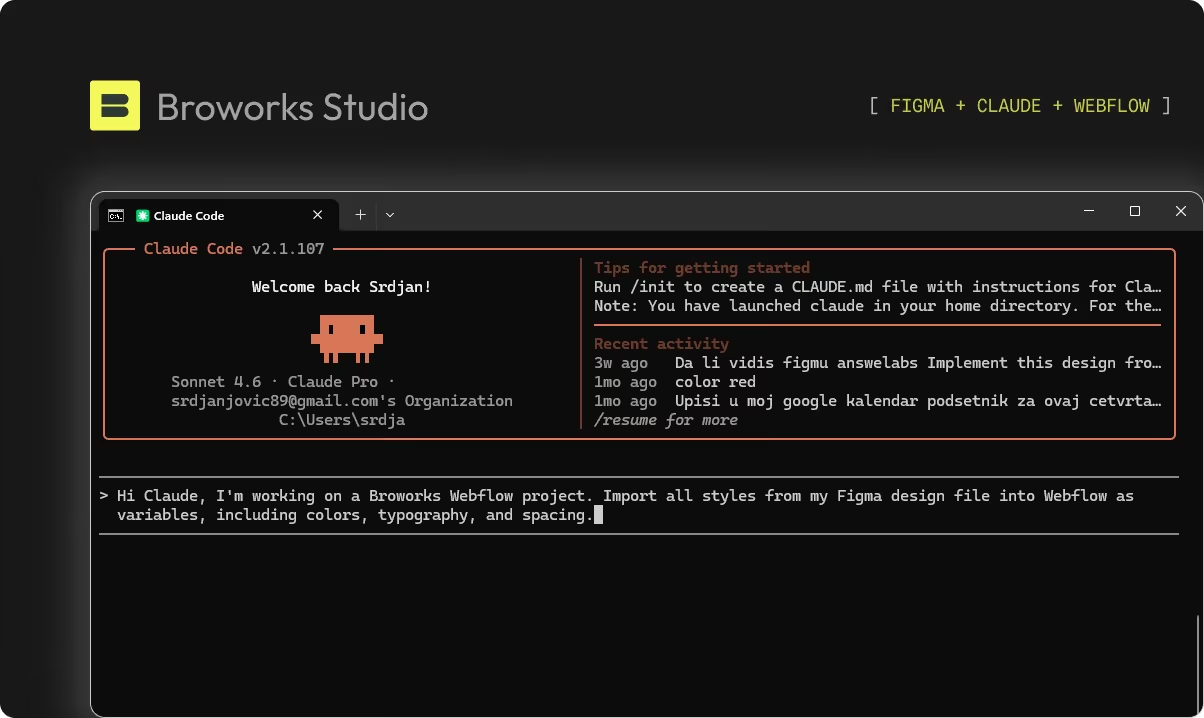
Ein konkretes Beispiel ist der Import des Style Guides zu Beginn eines neuen Projekts. Anstatt dass ein Entwickler Farben, Typografie und Abstands-Tokens manuell aus einer Figma-Datei in Webflow-Variablen überträgt, verbindet sich das Team direkt über den MCP-Server mit der Figma-Datei des Kunden und gibt einen Befehl im Terminal ein. Claude erstellt automatisch alle notwendigen Webflow-Variablen. Ein Prozess, der zuvor mehrere Stunden dauerte, wird auf wenige Minuten reduziert.
Mehr Geschichten
.svg)
.svg)